
Xero implementation mistakes are avoidable setup, migration, integration, and process errors that leave you running a modern finance platform on unreliable numbers. That matters more than the software choice itself, because a bad implementation damages reporting, compliance, cash flow control, and daily operations from day one. One real-world example put the cost of poor setup at £7,000, and the bigger danger was not the fee, it was making decisions on flawed data with total confidence.
What Xero Implementation Mistakes Actually Cost Your Business
Poor implementation is expensive in two ways. The direct cost shows up in fines, clean-up work, missed deductions, duplicate effort, and delayed reporting. The hidden cost is worse: you trust numbers that are incomplete, misclassified, or out of date, then use them to price jobs, approve spending, forecast cash, and assess profitability.
That is why Xero implementation mistakes are not small admin slip-ups. They are finance system failures. If bank feeds are disconnected, VAT codes are wrong, supplier records are duplicated, or approvals happen outside the system, your management accounts stop reflecting reality. You do not get real-time visibility. You get a polished dashboard sitting on bad inputs.
For businesses operating across Cyprus and Greece, or across multiple teams and entities, the stakes climb further. Tax handling, currency exposure, approval layers, and operational handoffs all need structure. If you want Xero to support connected finance and operations, the implementation has to be designed that way from the start.
Mistake 1: Treating Xero Setup as an Admin Task Instead of a Finance Systems Project
The first major mistake is assuming setup is just data entry and basic preferences. It is not. It is the design of how money, approvals, tax, reporting, and operational activity move through your business.
When setup is rushed, old inefficiencies get rebuilt inside new software. Sales invoicing still sits outside finance. Purchasing approvals still happen in email. Payroll journals still land late. Stock movements still fail to align with cost reporting. A cloud platform does not fix broken process logic by itself.
A proper implementation starts with process mapping. You need to define how finance connects to sales, purchasing, payroll, stock, expenses, approvals, and management reporting. That matters even more if your business spans locations, legal entities, or operational teams. This is exactly where Business Transformation work and finance system design have to meet.
What You Need to Scope Before You Switch On
Before you go live, you need a clear view of the outputs you expect from the system. Start with reporting. What do you need to see weekly and monthly: cash flow, departmental profitability, overdue debtors, project margin, VAT liabilities, budget versus actuals? If you do not define that first, the setup defaults will define it for you, badly.
Then scope your approval flows, tax treatment, bank accounts, currencies, user roles, integrations, historical data, and month-end routines. Decide who enters transactions, who approves them, who reviews exceptions, and how corrections are handled. If your old process relied on spreadsheets, inboxes, and manual workarounds, copying it into Xero simply locks the problem in more tightly.
Why a Staged Rollout Beats a Big-Bang Launch
A staged rollout gives you control. A big-bang launch gives you pressure. Xero itself advises against flipping everything at once and recommends a staged implementation so the change does not become rushed and overwhelming.
Phasing the rollout lets you validate bank feeds, invoice flows, approvals, and reports before every team depends on them. It also makes it easier to isolate errors. If something breaks, you know where. That is far better than discovering three weeks after go-live that your purchasing workflow, tax setup, and customer balances all went live with faults.

Mistake 2: Using the Default Chart of Accounts and Weak Tracking Structure
Your chart of accounts is not just an accounting list. It is the reporting architecture for your business. If it is too generic, too messy, or badly aligned to how you operate, every dashboard and management report becomes harder to trust.
Default account structures rarely reflect how you actually make money. They do not know your service lines, locations, departments, cost centres, margin drivers, or management priorities. The same applies to tracking categories. If they are missing or inconsistent, you lose visibility across teams and activities exactly when you need it most.
This is where Real-Time Accounting either works or fails. Live dashboards and KPI reporting depend on disciplined structure under the surface.
Build Reporting Around Decisions, Not Around Software Defaults
Build the chart around the decisions you need to make. If you want control over cash flow, you need clean separation of recurring overheads, one-off costs, financing items, tax liabilities, and operational spend. If you want profitability by segment, you need income and direct costs mapped in a way that reflects how you sell and deliver.
The same goes for performance by team, location, project, or entity. Structure the accounts and tracking so your monthly reports answer real management questions quickly. If you need a spreadsheet every month to get basic answers, the setup is already wrong.
Avoid Overcomplicating Tracking Categories
There is a balance here. Too little detail gives you weak reporting. Too much detail creates chaos. If your team has to choose between too many coding options, consistency falls apart. One manager uses one category. Another uses a different one. A third leaves it blank.
Tracking categories should be disciplined, limited, and directly tied to decision-making. Keep them simple enough for operational teams to use correctly every day. If you are already wondering whether your current structure has become messy, this is often a sign that your setup has stayed too basic for your growth.
Mistake 3: Migrating Bad Data and Assuming Opening Balances Are “Close Enough”
Bad migration poisons everything that follows. It creates a false starting point, then every report built on top of that point becomes unreliable. That is how businesses end up trusting dashboards that look clean but are fundamentally wrong.
The usual failures are predictable: incomplete customer and supplier records, duplicate contacts, wrong VAT codes, uncleared bank items, missing payroll liabilities, and opening balances that do not match the last validated trial balance. Xero can import historical data, including up to 12 months in many setups, but imported data still needs validation. Migration is not a file upload. It is a finance control exercise.
The Data Checks You Must Complete Before Go-Live
Before go-live, reconcile the trial balance, aged receivables, aged payables, VAT position, bank balances, outstanding invoices, payroll liabilities, and comparative periods. Every one of these needs to tie back to known, approved figures. No rounding guesses. No suspense assumptions. No “close enough”.
This matters because false confidence in bad data is one of the most damaging implementation failures. When bad data looks believable, your cash flow forecasts, tax estimates, and board reporting all drift off course without any obvious alarm.
Mistake 4: Connecting Apps Without Mapping the Data Flow
More apps do not mean more control. They often mean more confusion.
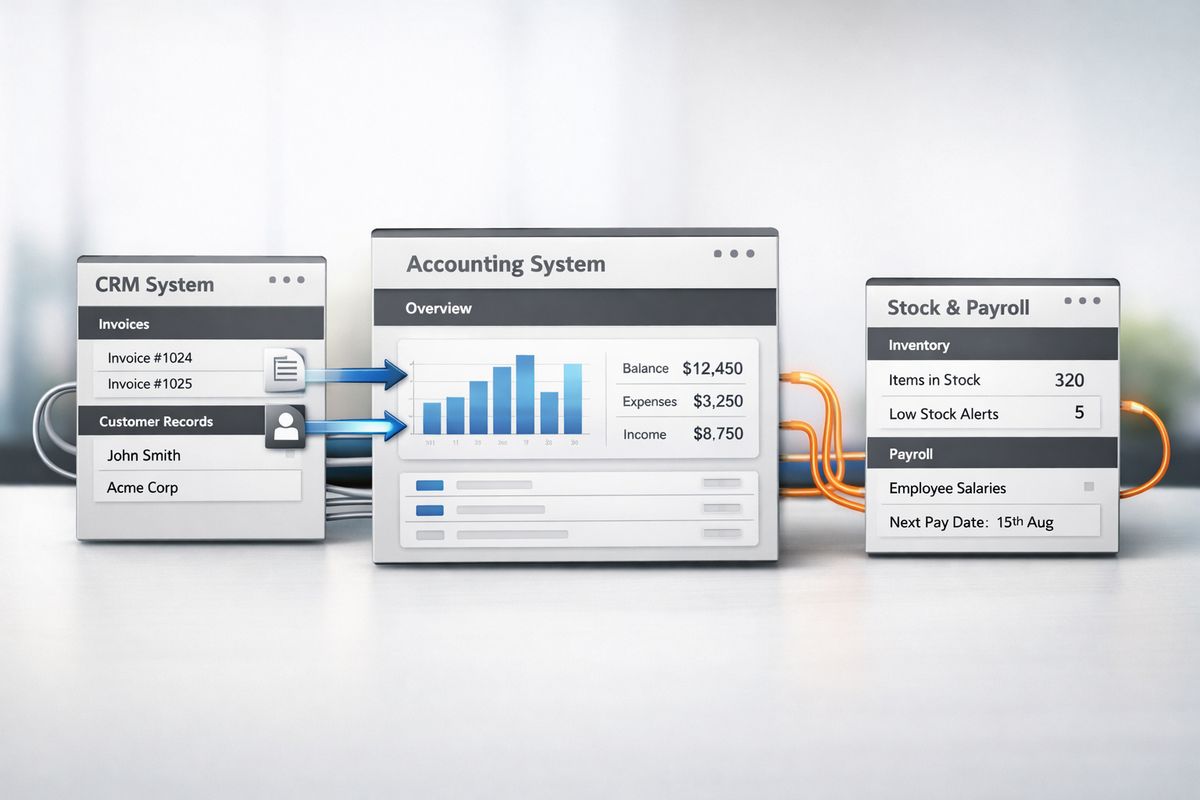
Xero connects with 800+ business apps and broad banking networks, which is useful only if every connection has a defined purpose, clean data mapping, and clear ownership. The failure point is chasing features instead of workflow fit. An app looks impressive in a demo, then creates duplicate records, partial syncs, tax mismatches, or manual exception handling in daily use.
If you want connected operations, map the data flow first. What starts in the operational system? What passes into Xero? What stays in the source system? Which system is the master record for contacts, invoices, stock, payments, and approvals? Without those answers, integration becomes another layer of admin.
Choose Integrations That Remove Work, Not Add Another Layer of It
A useful integration removes rekeying, duplicate uploads, and spreadsheet fixes. A weak one just hides them. Check whether the integration is genuinely API-based, whether support is reliable, whether the app can scale with your transaction volume, and whether your business still owns and can audit the data.
Pseudo-integrations are a common trap. If the process still depends on exports, CSV imports, or manual pushes, you have not automated the workflow. You have just added software to a manual process.
Test Every Sync Scenario Before You Rely on It
Testing has to go beyond a successful demo invoice. Run actual scenarios: invoice creation, payment matching, credit notes, tax treatment, stock updates, payroll journals, multi-entity transactions, and error handling. Broken syncs often fail silently, which is exactly why they are dangerous.
If your operation includes multiple currencies or cross-border activity, testing gets even more important. In that case, it helps to understand where Xero’s currency capability supports growth and where it needs careful design.
Mistake 5: Leaving Bank Feeds, Reconciliation Rules, and Automation Until Later
If your team is still downloading statements, typing supplier names manually, and reconciling line by line after implementation, the setup is incomplete. Bank feeds and automation are not optional enhancements. They are part of the core operating model.
Xero’s bank feeds and matching tools are designed to reduce manual reconciliation dramatically, with one source citing 5.5 hours a week saved through automation alone. That is not just admin time back. It is faster visibility, quicker exception handling, and cleaner month-end.
Where Automation Delivers Immediate ROI
The fastest wins usually come from bank reconciliation, recurring invoices, expense capture, approval routing, payment runs, and month-end routines. Each one cuts manual effort and improves control at the same time.
That is the important point. Automation is not only about speed. It creates consistency. Coding rules reduce classification errors. Automated matching keeps bank data current. Approval workflows stop spend from bypassing review. If you want a deeper look at where the biggest gains usually sit, reducing reconciliation friction with the right rules and flows is one of the clearest places to start.
Mistake 6: Underestimating VAT, Compliance, and Local Reporting Requirements
Compliance failures are implementation failures. If VAT is wrong, filing periods are wrong, invoice formats are wrong, permissions are weak, or source documents are missing, your setup is not complete.
This matters even more as MTD expands in 2026 and businesses face more pressure for digital records, auditability, and filing discipline. For businesses with activity across Cyprus and Greece, the wider issue is the same: local tax treatment, cross-border workflows, payroll links, and audit trails must be configured deliberately. You do not fix compliance later with month-end heroics.
Compliance Settings to Lock Down From Day One
Lock down VAT codes, filing periods, invoice formats, contact tax treatment, payroll postings, user permissions, approval controls, and document capture from the start. Make sure posting logic is consistent and review rights are clear. Restrict access where needed. Preserve the audit trail.
This is not bureaucracy. It is control. Clean compliance comes from disciplined configuration, not from asking the finance team to catch errors after the fact.
Mistake 7: Assuming Your Team Will “Figure It Out”
Intuitive software still fails without training. That is because the issue is not where to click. The issue is how transactions should be entered, coded, approved, reviewed, and corrected across the business.
When teams are left to figure it out, habits take over. People bypass workflows, keep side spreadsheets, upload documents inconsistently, and code similar transactions in different ways. Reporting quality falls, adoption stalls, and the finance team spends month-end fixing avoidable errors.
Train by Role, Not in One Generic Session
Your finance team needs deeper process training. Approvers need to understand controls, cut-offs, and exceptions. Operational managers need to know how their actions affect costs, budgets, and reporting. Directors need to know what dashboards mean and what they do not.
Role-based enablement works because it reflects how the system is actually used. One generic session does not. If you want adoption that sticks, focus on training that changes daily behaviour, not just familiarity with the screens.
Replace Spreadsheet Habits With Embedded Workflows
After go-live, look for every manual workaround still in use. If invoices are being rekeyed, statements are downloaded manually, approvals happen in chat messages, or KPI packs are rebuilt in Excel, implementation is unfinished.
The goal is embedded workflow. Finance, operations, and management should be working from one connected process, not translating data between disconnected tools.
How to Spot a Bad Xero Implementation Early
Bad implementations reveal themselves quickly if you know what to look for. Your dashboards do not tie to underlying reports. Suspense balances appear and stay there. VAT returns need regular corrections. Month-end drifts later every cycle. Documents are missing. The same data is entered twice. Managers make decisions outside the system because they do not trust what they see inside it.
You also see warning signs in behaviour. Finance teams exporting everything to Excel. Operations asking for numbers that should already be visible. Approvers relying on email threads. Bank transactions sitting unreconciled for days. Payroll journals posted late. None of this is normal for a well-implemented cloud finance setup.
If those symptoms exist, the issue is rarely “Xero does not work”. The issue is that the implementation never matched the way your business runs.
How to Get Xero Implementation Right From the Start
Good implementation follows a simple discipline: scope first, design reporting around decisions, clean the data before migration, test integrations properly, automate core workflows early, train each role properly, and review the setup regularly as your business evolves.
That gives you something much more valuable than accounting software. It gives you control. You get reliable numbers, faster month-end, stronger cash flow visibility, cleaner compliance, and a finance system that actually connects with operations.
If you are building that foundation across Cyprus or Greece, or untangling an existing setup that no longer supports the business, Prodyssey Solutions brings finance, technology, and operations into one working model. That is how Xero stops being a bookkeeping tool and starts becoming a platform for real-time business decisions.
Leave a Reply