
Xero approval workflows are the rules and sign-off steps that control bills, purchase orders, invoices, and payments before anything gets posted or paid. If your team still relies on inboxes, phone calls, and memory, this is where speed, control, and accountability start to break down. Once you understand how these workflows work, it becomes obvious why growing businesses stop treating approvals as admin and start treating them as a finance control.
What Xero Approval Workflows Actually Do
Xero approval workflows create a structured path for spend decisions. Instead of a document landing in finance and waiting for somebody to notice it, the right person gets asked to approve it, reject it, or send it back with comments. That brings order to what is usually a messy handoff between operations, procurement, and finance.
The real promise is simple: faster sign-offs, tighter spend control, and less chaos. You stop paying invoices late because nobody knew who owned the decision. You stop guessing whether a purchase was authorised. You also stop turning month-end into a clean-up exercise.
Where Xero’s Native Approval Feature Starts
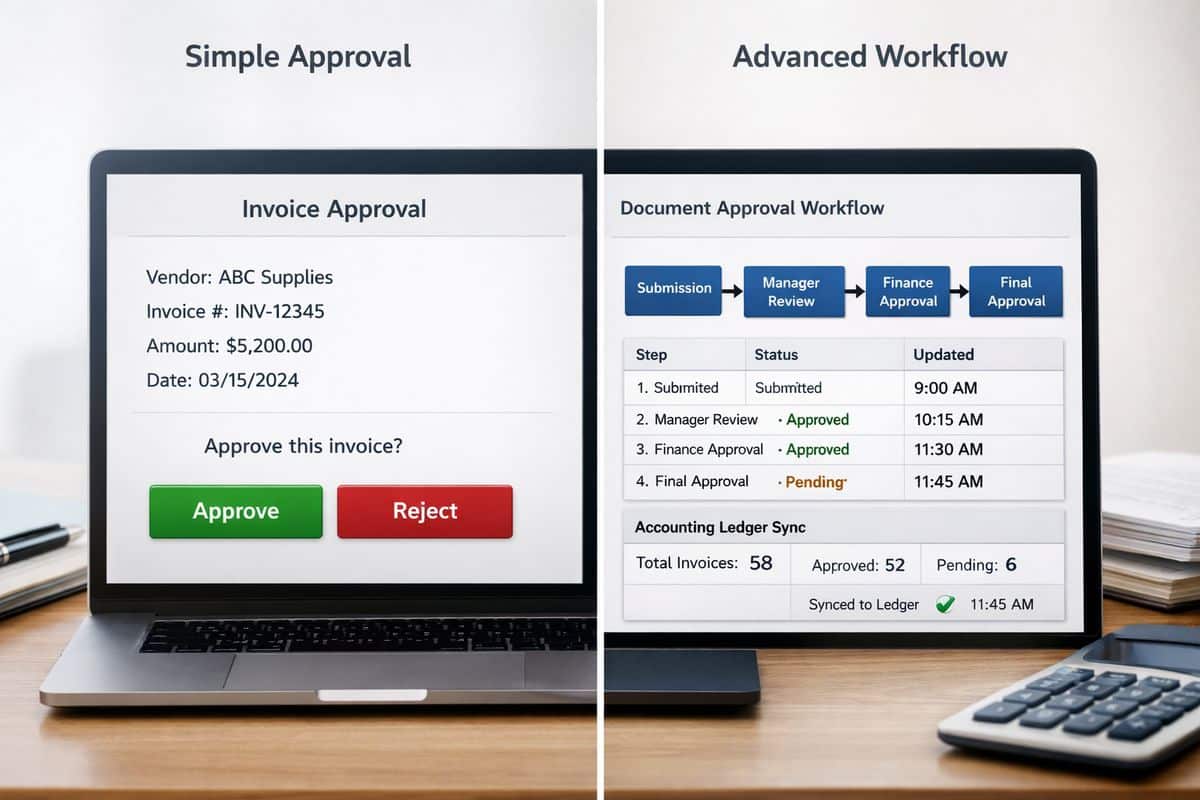
Native Xero gives you a basic approval checkpoint for bills through an “Awaiting Approval” status. An authorised approver can review the bill and either approve or reject it before it moves forward. For a small business with low invoice volume and one or two decision-makers, that is often enough.
That works best when approval logic is simple. One bill comes in, one person checks it, finance posts it. Clean and manageable.
Where Basic Approval Status Stops Being Enough
Growth changes everything. Once approvals depend on amount thresholds, departments, project budgets, locations, or legal entities, a simple status is no longer a workflow. It is just a queue.
Here is where the cracks show. Native bill approval does not support threshold-based routing, true sequential or parallel approvals, or deeper conditional logic by supplier, category, cost centre, or entity. Finance ends up chasing people manually, operations loses momentum, and nobody has a reliable view of what is waiting, blocked, or overdue. If that sounds familiar, your current setup has probably been outgrown.

Why Growing Teams Outgrow Email and Ad Hoc Sign-Offs
Email approvals feel easy at first because they require no design. But that convenience disappears as soon as volume rises. Invoices get buried in inboxes, forwarded to the wrong person, approved without context, or forgotten altogether.
That creates duplicated effort across every department. Finance re-asks questions that procurement already answered. Managers approve from memory because the original document is lost in a thread. Payment deadlines drift, supplier relationships take the hit, and cash flow becomes reactive instead of controlled.
The Hidden Cost of Manual Approval Handling
Manual invoice handling is not just annoying. It is expensive. Research regularly places invoice processing costs between $8 and $30 per invoice, while automation can reduce that by up to 70%. Across a busy finance function, that turns into real money, real admin hours, and real delays.
The damage goes further than cost per invoice. Approval bottlenecks slow month-end, distort live reporting, and waste management time on follow-ups instead of decisions. That is why businesses looking at connected finance automation usually start with approvals. The return is immediate because the friction is visible every day.
The Risk You Carry Without Formal Controls
Weak approvals create exposure on three fronts: error, overspend, and fraud. Duplicate invoices slip through because no check happens before review. Documents get edited after a verbal sign-off. Supplier bank detail changes are missed. Nobody can prove who approved what.
That is not a minor process issue. Accounts payable fraud has a median cost in the six figures, and small businesses are not protected by being small. Formal workflows add auditability, clear accountability, and payment protection. Every decision is timestamped, attributed, and traceable.
The Core Building Blocks of an Effective Xero Approval Workflow
An effective workflow is not about adding clicks. It is about making sure routine spend moves quickly while higher-risk spend gets the right scrutiny. Done properly, approvals become faster because the decision path is already defined.
Multi-Step and Threshold-Based Approvals
You need approval levels that reflect risk. A low-value recurring supplier bill should not wait for director review. A large project invoice absolutely should. Multi-step workflows enforce that automatically, using value thresholds and escalation rules.
That gives you control without creating drag. Routine approvals stay fast. Higher-value or exceptional items move up the chain with no argument about who should look at them.
Smart Routing by Supplier, Category, Cost Centre, or Entity
The best workflows send documents to the right person based on rules, not guesswork. If a bill belongs to a specific supplier, department, cost centre, or group company, the system routes it there immediately.
That matters even more if you operate across Cyprus and Greece, where entity structure, location responsibility, and management oversight often overlap. If your business is already dealing with group-level finance complexity, smart routing stops approvals from becoming a bottleneck between entities.
Audit Trails, Comments, and Full Visibility
A proper audit trail shows who reviewed a document, when action happened, what changed, and why a decision was made. Comments matter just as much as the approval itself because they preserve context.
Without that history, every dispute turns into detective work. With it, finance can resolve issues quickly, support audits cleanly, and enforce internal controls without friction.
Mobile, Email, and Real-Time Notifications
Approvers are busy. If approval requires a desktop login and a spare half hour, delays are guaranteed. Modern workflow tools remove that delay through mobile approvals, email actions, and automatic reminders.
That is one reason dedicated tools have gained traction. ApprovalMax, for example, has 625 reviews and a 4.79 rating in the Xero ecosystem because it addresses exactly this operational gap: approvals that move in real time instead of waiting for someone to return to the office.
How the Workflow Works from Capture to Payment
A strong approval process starts before approval and ends after sign-off. The goal is not a single button. The goal is a controlled path from document capture to payment readiness.
Step 1: Capture and Validate the Document
The process starts when an invoice or purchase document is captured. Good systems extract key details, support coding, check supplier data, and screen for duplicates before approval begins.
That first control point matters more than most businesses realise. Bad data at intake creates bad approvals later. Stronger capture and validation prevent errors from entering the workflow in the first place.
Step 2: Route for Approval Automatically
Once validated, the document follows rules you have already defined. Thresholds, approver hierarchies, categories, and entity logic decide who needs to review it. No manual forwarding. No guessing.
This is where workflow design pays off. You remove admin handling and replace it with consistency.
Step 3: Approve, Reject, or Send Back with Comments
At decision stage, the approver has three clean options: approve, reject, or send back with comments. That sounds basic, but it is the difference between a controlled loop and endless confusion.
Comments keep the process moving because questions stay attached to the document. Rejection reasons become visible. Revisions happen inside the workflow, not across scattered emails.
Step 4: Sync to Xero and Support Payment Control
After approval, the document syncs into Xero as part of the accounting record. The strongest systems keep the ledger updated while preserving the approval logic outside the ledger itself. That separation is smart. Xero holds the books, while the workflow layer manages operational control.
For businesses working with /Prodyssey Solutions, that same principle sits behind Business Transformation: finance and operations run better when each system has a clear role and the flow between them is connected.
Native Xero vs Add-On Workflow Tools: What Changes in Practice
The difference is not branding or interface. The difference is control.
When Native Xero Is Enough
Native Xero is enough when your approval needs are simple: low invoice volume, limited approvers, straightforward spend rules, and no complex routing. In that environment, a basic approve-or-reject checkpoint does the job.
When a Dedicated Workflow Tool Becomes the Better Option
A dedicated workflow tool becomes the better option when approvals cross departments, entities, or value thresholds, or when compliance and auditability matter. This is where tools such as ApprovalMax add real business value through multi-step logic, mobile and email approvals, and end-to-end control from bill arrival to payment.
What Better Approval Workflows Deliver to Your Business
Better workflows do not just tidy up finance admin. They change how your business runs.
Faster Sign-Offs and Stronger Cash Flow Control
When invoices move through approvals faster, you gain control over due dates, supplier commitments, and payment timing. Cash flow becomes planned rather than reactive.
Better KPIs, Fewer Errors, and Cleaner Month-End
Standardised approvals improve coding accuracy, reduce manual corrections, and support cleaner reporting. Your dashboards become more trustworthy because the data entering the ledger is already controlled.
Connected Finance and Operations
This is the real shift. Finance, procurement, and operations stop working through disconnected emails and verbal approvals and start working through one controlled process. That is exactly where platforms such as InsightFlow and services like Real-Time Accounting create value: live visibility, cleaner handoffs, and better decisions.
Common Questions About Xero Approval Workflows
Does Xero Have Approval Workflows Built In?
Yes, but only at a basic level. Xero supports bill approval status for simple approve-or-reject handling. Full workflow automation requires more than a status field.
Can You Approve Bills and Purchase Orders Outside Xero?
Yes. Connected tools often allow approvals through mobile, email, or dedicated apps while keeping Xero updated as the accounting ledger.
What Should You Look for Before Choosing a Solution?
Look for threshold enforcement, routing rules, audit trails, duplicate detection, supplier validation, two-way sync, and multi-entity support. If those are missing, you do not have a workflow. You have a queue with extra steps.
Once you see Xero approval workflows properly, the decision becomes straightforward: use native approval for simple control, and move to a dedicated workflow layer as soon as your business needs real routing, real visibility, and real accountability. That is the point where faster sign-offs stop being a convenience and start becoming a business advantage.
Leave a Reply